With more people accessing your business through a digital experience, application performance is more critical than ever, and managing resources across your complex IT environment has big implications on user experience and costs. In this sample chapter from Cisco Cloud Infrastructure, you will learn about workload management solutions including Intersight Workload Optimization Manager (IWO) and Cisco Intersight Kubernetes Service.
Cisco has been working for over three years to bring the industry-leading Application Resource Management (ARM) capability to Cisco customers. It started with Cisco Workload Optimization Manager (CWOM). CWOM is powered by Turbonomic, and it enables Cisco customers to continuously resource applications to perform at the lowest cost while adhering to policies irrespective of where the application is hosted (that is, on the premises or in the cloud, containers, or VMs). In January 2020, Cisco announced Intersight Workload Optimizer (IWO), which is the integration of CWOM and Intersight. With IWO, application and infrastructure teams can now speak the same language to ensure that applications are automatically and continuously resourced to perform.
Alongside the Intersight Workload Optimizer, Cisco offers Intersight Kubernetes Service (IKS), which is a fully curated, lightweight container management platform for delivering multicloud production-grade upstream Kubernetes. It simplifies the process of provisioning, securing, scaling, and managing virtualized Kubernetes clusters by providing end-to-end automation, including the integration of networking, load balancers, native dashboards, and storage provider interfaces.
This chapter will cover the following topics:
IT challenges and workload management solutions
Intersight Workload Optimization Manager
Cisco Container Platform
Cisco Intersight Kubernetes Service
IT Challenges and Workload Management Solutions
Managing application resources in a dynamic, hybrid cloud world is increasingly complex, and IT teams are struggling. With application components running on the premises and in public clouds, end users can suffer outages or experience slow application performance because IT teams simply lack visibility to see how things are connected and how to manage their dynamic environment at scale.
With more people accessing your business through a digital experience, application performance is more critical than ever. Managing workload placement and resources across your ever-changing IT environment is a complex, time-consuming task that has big implications on user experience and costs.
Cisco Intersight Workload Optimizer (CWOM) discovers how all the parts of your hybrid world are connected and then automates these day-to-day operations for you. Supporting more than 50 common platforms and public clouds, it provides real-time, full-stack visibility across your applications and infrastructure. Now you can harness the power of data to continuously monitor supply and demand, match workloads and resources in the most efficient way, and ensure that governance rules are always enforced. The result? Better application performance, reduced cost, faster troubleshooting, and more peace of mind.
Business Impact
Unchecked complexity can result in the following:
Underutilized on-premises infrastructure: To ensure application performance, IT teams often allocate resources modeled to peak-load estimates and/or set conservative utilization limits.
Public cloud overprovisioning and cost overruns: When planning and placing workloads in public clouds, IT teams routinely overprovision computing instance sizes as a hedge to ensure application performance.
Wasted time: IT teams end up chasing alerts and meeting in war rooms to unravel problems instead of supporting innovation.
Figure 5-1 illustrates why managing hybrid cloud resources to ensure application performance and control costs is a complex problem.
)
Figure 5-1 Hybrid cloud resources for ensuring performance and cost
The following are some of the challenges of workload management in a hybrid cloud:
Siloed teams with different toolsets managing different layers of the stack and multiple types of resources
Flying blind without a unified view of the complex interdependencies between layers of infrastructure and applications across on-premises and public cloud environments
Separating the signal from the noise and prioritizing the constant flow of alerts coming from separate tools
Lack of visibility into underutilized capacity in public clouds and cost overruns from unmanaged spikes in utilization
To deal with all this complexity, the only choice is to automate resource management and workload placement operations. But how? To optimize effectively, you need a way to collect and track streams of telemetry data from dozens, hundreds, perhaps thousands of sources. You need a way to correlate and continuously analyze all of this data to understand how everything fits together and what’s important, as well as how to decide what to do from moment to moment as things continue to change. New tooling is required to connect all the dots and give you the insight you need to stay ahead of demand, stay ahead of problems, and respond to new projects with confidence. What if you could create a unified view of your environment and continuously ensure that applications get the resources they need to perform, all while increasing efficiency and lowering costs?
Cisco Intersight Workload Optimizer
Cisco Intersight Workload Optimizer is a real-time decision engine that ensures the health of applications across your on-premises and public cloud environments while lowering costs. The intelligent software continuously analyzes workload demand, resource consumption, resource costs, and policy constraints to determine an optimal balance. Cisco IWO is an artificial intelligence for IT operations (AIOps) toolset that makes recommendations for operators and can trigger workload placement and resource allocations in your data center and the public cloud, thus fully automating real-time optimization.
With Cisco IWO, infrastructure and operations teams are armed with visibility, insights, and actions that ensure service level agreements (SLAs) are met while improving the bottom line. Also, application and DevOps teams get comprehensive situational awareness so they can deliver high-performing and continuously available applications.
Benefits of using Cisco Intersight Workload Optimizer:
Radically simplify application resource management with a single tool that dynamically optimizes resources in real time to ensure application performance.
Continuously optimize critical IT resources, resulting in more efficient use of existing infrastructure and lower operational costs on the premises and in the cloud.
Take the guesswork out of planning for the future with the ability to quickly model what-if scenarios based on the real-time environment.
Figure 5-2 illustrates how IWO ensures application performance with continuous visibility, deep insights, and informed actions.
)
Figure 5-2 Application performance with continuous visibility, deep insights, and informed actions
CWOM-to-IWO Migration
In June 2019, Turbonomic and CWOM became inaugural members of the Integration Partner Program (IPP), which takes the technology partnership to another level by helping joint customers maximize the value of their AppDynamics and CWOM investment. The extended integration and partnership delivers on the vision of AIOps, where software is making dynamic resourcing decisions and automating actions to ensure that applications are always performing, enabling positive business outcomes and improved user experiences. Organizations across the world are investing heavily in developing new applications and innovating faster to deliver better, more simplified user experiences. The partnership and the combination of AppDynamics and CWOM ensure that applications are architected and written well and are continuously resourced for performance.
As a full-stack, real-time decision engine, Intersight Workload Optimizer revolutionizes how teams manage application resources across their multicloud landscape, significantly simplifying operations. It delivers unprecedented levels of visibility, insights, and automated actions, as customers look to prevent application performance issues.
Figure 5-3 provides a very high-level view of IWO application management.
)
Figure 5-3 Very high-level view of IWO application management
Simply put, IWO provides the following customer benefits:
It bridges the gap between application and IT teams to ensure application performance.
It eliminates application resourcing as a source of application delay, meaning applications can perform and continuously deliver services.
It helps IT departments stop overspending and delivers a modern application hosting platform to end users.
It enables high-value application and IT teams to focus on strategy and innovation without jeopardizing applications.
IWO expands Intersight capabilities. All in one place, Intersight customers can manage the health of the infrastructure and how well that infrastructure is utilized to ensure application performance. Additionally, Intersight customers can monitor and manage application resources on third-party infrastructure, public cloud, and container environments.
Optimize Hybrid Cloud Infrastructure with IWO
Application resource management is a top-down, application-driven approach that continuously analyzes applications’ resource needs and generates fully automatable actions to ensure applications always get what they need to perform. It runs 24/7/365 and scales with the largest, most complex environments.
To perform application resource management, Intersight Workload Optimizer represents your environment holistically as a supply chain of resource buyers and sellers, all working together to meet application demand. By empowering buyers (VMs, instances, containers, and services) with a budget to seek the resources that applications need to perform and empowering sellers to price their available resources (CPU, memory, storage, network) based on utilization in real time, IWO keeps your environment within the desired state, with operating conditions that achieve the following conflicting goals at the same time:
Ensured application performance: Prevent bottlenecks, upsize containers/VMs, prioritize workload, and reduce storage latency
Efficient use of resources: Consolidate workloads to reduce infrastructure usage to the minimum, downsize containers, prevent sprawl, and use the most economical cloud offerings
IWO is a containerized, microservices-architected application running in a Kubernetes environment (or within a VM) on your network or a public cloud VPC (Virtual Private Cloud). You assign services running on your network to be IWO targets. IWO discovers the entities (physical devices, virtual components, and software components) that each target manages and then performs analysis, anticipates risks to performance or efficiency, and recommends actions you can take to avoid problems before they occur.
Intelligent, proactive workload optimization simplifies and automates operations. With many tools, the focus is on monitoring and alerting users after a problem has occurred. Cisco IWO is a proactive tool that is designed to avoid application performance issues in the first place. It continuously analyzes workload performance, costs, and compliance rules and makes recommendations on what specific actions to take to avoid issues before they happen, thus radically simplifying and improving day-to-day operations.
While some tools provide visibility into applications or visibility into an individual tier of physical or virtual infrastructure, Cisco IWO bridges all these layers with a single tool. It creates a dynamic dependency graph that visualizes the connections between application elements and infrastructure throughout the layers of the stack, all the way down to component resources within servers, networking, and storage. Figure 5-4 shows how Cisco IWO analyzes telemetry data across your hybrid cloud environment to optimize resources and reduce cost.
)
Figure 5-4 Cisco IWO analyzes telemetry data across your hybrid cloud environment to optimize resources and reduce cost
Cisco IWO can optimize workloads in any infrastructure, any environment, and any cloud, and it works with the industry’s top platforms, including VMware vSphere, Microsoft Hyper-V, Citrix XenServer, and OpenStack. It automatically manages compute, storage, and network resources across these platforms, both on the premises and in the cloud. It analyzes telemetry data from a broad ecosystem of data center and cloud technologies, with agentless support for over 50 targets across a range of hypervisors, compute platforms (including Cisco UCS and HyperFlex), container platforms, public clouds, and more. Cisco IWO correlates these telemetry sources into a holistic view to deliver intelligent recommendations and trigger actions, including where to place workloads and how to size and scale resources.
Cisco Intersight is a cloud operations platform that delivers intelligent visualization, optimization, and orchestration for applications and infrastructure across public cloud and on-premises environments. It provides an essential control point for customers to get more value from hybrid cloud investments.
The Cisco IWO service extends these capabilities with hybrid cloud application resource management and support for a broad third-party ecosystem. With this powerful solution, you can have confidence that your applications have continuous access to the IT resources they need to perform, at the lowest cost, whether they reside on the premises or in a public cloud.
The combination of Cisco IWO and AppDynamics can break down siloes between IT teams. This integration provides a single source of truth for application and infrastructure teams to work together more effectively, avoiding finger pointing and late-night war rooms.
AppDynamics discovers and maps your business application topology and how it uses IT resources. Cisco IWO correlates this data with your infrastructure stacks to create a dynamic dependency graph of your hybrid IT environment. It analyzes supply and demand and drives workload placement and resource allocation actions in your IT environment to help ensure that application components get the computing, storage, and network resources they need. Together, these intelligent tools replace sizing guesswork with real-time analytics and modeling so that you know how much infrastructure is needed to allow your applications and business to keep pace with demand.
If you have workloads running on the premises and in public clouds, your IT teams need to make complex, on-going decisions about where to locate workloads and how to size resources in order to ensure performance and minimize cost.
Figuring out what workloads should run where is nearly impossible if you lack clear visibility into available resources and associated costs. And for workloads that run in the cloud, how do you determine what cloud instance or tier is the best fit at the lowest cost? Cloud costs can become volatile, and you can get lost in a myriad of sizing, placement, and pricing decisions that can have very expensive consequences. Cisco IWO can help in the following ways:
Manage resource allocation and workload placement in all your infrastructure environments, giving you full-stack visibility in a single pane of glass for supply and demand across your combined on-premises and cloud estate.
Optimize cloud costs with automated selection of instances, reserved instances (RIs), relational databases, and storage tiers based on workload consumption and optimal costs.
Dynamically scale, delete, and purchase the right cloud resources to ensure performance at the lowest cost.
Extend on-premises resources by continuously optimizing workload placement and cutting overprovisioning based on utilization trends.
De-risk migrations to and from the cloud with a data-driven scenario modeling engine.
In increasingly competitive markets, more organizations are adopting containerized deployment options to deliver business-differentiating applications quickly. Kubernetes has become the de facto standard for container orchestration and helps to build, deliver, and scale applications faster. For IT teams, Kubernetes has introduced new layers of complexity with interdependencies and fluctuating demand that make it nearly impossible to effectively manage modern IT at scale.
Cisco IWO simplifies Kubernetes deployments and optimizes performance and cost in real time for on-going operations in the following ways:
Container rightsizing: Scale container limits/requests up or down based on application demand.
Pod “move”/rescheduling: Reschedule pods while maintaining service availability to avoid resource fragmentation and/or contention on the node.
Cluster scaling: When Cisco IWO sees that pods have too little (or too much) capacity in a cluster, it will give the recommendation to spin up another node (or to suspend nodes).
Container planning: Model what-if scenarios based on your real-time environment. With a few clicks, you can determine how much headroom you have in your clusters or simulate adding or removing Kubernetes pods.
How Intersight Workload Optimizer Works
To keep your infrastructure in the desired state, IWO performs application resource management. This is an ongoing process that solves the problem of ensuring application performance while simultaneously achieving the most efficient use of resources and respecting environment constraints to comply to business rules. This is not a simple problem to solve. Application resource management has to consider many different resources and how they are used in relation to each other, in addition to numerous control points for each resource. As you grow your infrastructure, the factors for each decision increase exponentially. On top of that, the environment is constantly changing—to stay in the desired state, you are constantly trying to hit a moving target. To perform application resource management, IWO models the environment as a market made up of buyers and sellers. These buyers and sellers make up a supply chain that represents tiers of entities in your inventory. This supply chain represents the flow of resources from the data center, through the physical tiers of your environment, into the virtual tier and out to the cloud. By managing relationships between these buyers and sellers, IWO provides closed-loop management of resources, from the data center through to the application.
IWO uses virtual currency to give a budget to buyers and assign cost to resources. This virtual currency assigns value across all tiers of your environment, making it possible to compare the cost of application transactions with the cost of space on a disk or physical space in a data center. The price that a seller charges for a resource changes according to the seller’s supply. As demand increases, prices increase. As prices change, buyers and sellers react. Buyers are free to look for other sellers that offer a better price, and sellers can duplicate themselves (open new storefronts) to meet increasing demand. IWO uses its Economic Scheduling Engine to analyze the market and make these decisions. The effect is an invisible hand that dynamically guides your IT infrastructure to the optimal use of resources. To get the most out of IWO, you should understand how it models your environment, the kind of analysis it performs, and the desired state it works to achieve. Figure 5-5 illustrates the desired state graph for infrastructure management.
)
Figure 5-5 Desired state graph for infrastructure management
The goal of application resource management is to ensure performance while maintaining efficient use of resources. When performance and efficiency are both maintained, the environment is in the desired state. You can measure performance as a function of delay, where zero delay gives the ideal quality of service (QoS) for a given service. Efficient use of resources is a function of utilization, where 100% utilization of a resource is the ideal for the most efficient utilization.
If you plot delay and utilization, the result is a curve that shows a correlation between utilization and delay. Up to a point, as you increase utilization, the increase in delay is slight. There comes a point on the curve where a slight increase in utilization results in an unacceptable increase in delay. On the other hand, there is a point in the curve where a reduction in utilization doesn’t yield a meaningful increase in QoS. The desired state lies within these points on the curve.
You could set a threshold to post an alert whenever the upper limit is crossed. In that case, you would never react to a problem until delay has already become unacceptable. To avoid that late reaction, you could set the threshold to post an alert before the upper limit is crossed. In that case, you guarantee QoS at the cost of over-provisioning—you increase operating costs and never achieve efficient utilization.
Instead of responding after a threshold is crossed, IWO analyzes the operating conditions and constantly recommends actions to keep the entire environment within the desired state. If you execute these actions (or let IWO execute them for you), the environment will maintain operating conditions that ensure performance for your customers, while ensuring the lowest possible cost thanks to efficient utilization of your resources.
Understanding the Market and Virtual Currency
To perform application resource management, IWO models the environment as a market and then uses market analysis to manage resource supply and demand. For example, bottlenecks form when local workload demand exceeds the local capacity—in other words, when demand exceeds supply. By modeling the environment as a market, IWO can use economic solutions to efficiently redistribute the demand or increase the supply.
IWO uses two sets of abstraction to model the environment:
Modeling the physical and virtual IT stack as a service supply chain: The supply chain models your environment as a set of managed entities. These include applications, VMs, hosts, storage, containers, availability zones (cloud), and data centers. Every entity is a buyer, a seller, or both. A host machine buys physical space, power, and cooling from a data center. The host sells resources such as CPU cycles and memory to VMs. In turn, VMs buy host services and then sell their resources (VMem and VCPU) to containers, which then sell resources to applications.
Using virtual currency to represent delay or QoS degradation, and to manage the supply and demand of services along the modeled supply chain: The system uses virtual currency to value these buy/sell transactions. Each managed entity has a running budget. The entity adds to its budget by providing resources to consumers, and the entity draws from its budget to pay for the resources it consumes. The price of a resource is driven by its utilization—the more demand for a resource, the higher its price.
Figure 5-6 illustrates the IWO abstraction model.
)
Figure 5-6 IWO abstraction model
These abstractions open the whole spectrum of the environment to a single mode of analysis—market analysis. Resources and services can be priced to reflect changes in supply and demand, and pricing can drive resource allocation decisions. For example, a bottleneck (excess demand over supply) results in rising prices for the given resource. Applications competing for the same resource can lower their costs by shifting their workloads to other resource suppliers. As a result, utilization for that resource evens out across the environment and the bottleneck is resolved.
Risk Index
Intersight Workload Optimizer tracks prices for resources in terms of the Risk Index (RI). The higher this index for a resource, the more heavily the resource is utilized, the greater the delay for consumers of that resource, and the greater the risk to your QoS. IWO constantly works to keep the RI within acceptable bounds.
You can think of the RI as the cost for a resource, and IWO works to keep the cost at a competitive level. This is not simply a matter of responding to threshold conditions. IWO analyzes the full range of buyer/seller relationships, and each buyer constantly seeks out the most economical transaction available.
This last point is crucial to understanding IWO. The virtual environment is dynamic, with constant changes to workload that correspond with the varying requests your customers make of your applications and services. By examining each buyer/seller relationship, IWO arrives at the optimal workload distribution for the current state of the environment. In this way, it constantly drives your environment toward the desired state.
Understanding Intersight Workload Optimizer Supply Chain
Intersight Workload Optimizer models your environment as a market of buyers and sellers. It discovers different types of entities in your environment via the targets you have added, and it then maps these entities to the supply chain to manage the workloads they support. For example, for a hypervisor target, IWO discovers VMs, the hosts and datastores that provide resources to the VMs, and the applications that use VM resources. For a Kubernetes target, it discovers services, namespaces, containers, container pods, and nodes. The entities in your environment form a chain of supply and demand, where some entities provide resources while others consume the supplied resources. IWO stitches these entities together, for example, by connecting the discovered Kubernetes nodes with the discovered VMs in vCenter.
Supply Chain Terminology
Cisco introduces specific terms to express IT resources and utilization in relation to supply and demand. The terms shown in Table 5-1 are largely intuitive, but you should understand how they relate to the issues and activities that are common for IT management.
Table 5-1 The Supply Chain Terminologies Used in IWO
Term |
Definition |
|---|---|
Commodity |
This is the basic building block of IWO supply and demand. All the resources that IWO monitors are commodities. For example, the CPU capacity and memory that a host can provide are commodities. IWO can also represent clusters and segments as commodities. When the user interface (UI) shows “commodities,” it’s showing the resources a service provides. When the interface shows “commodities bought,” it’s showing what that service consumes. |
Composed of |
This refers to the resources or commodities that make up the given service. For example, in the UI you might see that a certain VM is composed of commodities, such as one or more physical CPUs, an Ethernet interface, and physical memory. Contrast “composed of” with “consumes,” where consumption refers to the commodities the VM has bought. Also contrast “composed of” with the commodities a service offers for sale. A host might include four CPUs in its composition, but it offers CPU cycles as a single commodity. |
Consumes |
This refers to the services and commodities a service has bought. A service consumes other commodities. For example, a VM consumes the commodities offered by a host, and an application consumes commodities from one or more VMs. In the UI, you can explore the services that provide the commodities the current service consumes. |
Entity |
This refers to a buyer or seller in the market. For example, a VM or a data-stores is an entity. |
Environment |
This refers to the totality of data center, network, host, storage, VM, and application resources that you are monitoring. |
Inventory |
This is the list of all entities in your environment. |
Risk Index |
This is a measure of the risk to quality of service (QoS) that a consumer will experience. The higher the Risk Index (RI) on a provider, the more risk to QoS for any consumer of that provider’s services. For example, a host provides resources to one or more VMs. The higher the RI on the provider, the more likely that the VMs will experience QoS degradation. In most cases, for optimal operation, the RI on a provider should not go into double digits. |
Working with Intersight Workload Optimizer
The public cloud provides compute, storage, and other resources on demand. By adding an AWS Billing Target (AWS) or Microsoft Enterprise Agreement (Azure) to use custom pricing and discover reserved instances, you enable IWO to use that richer pricing information to calculate workload size and RI coverage for your Azure environment. You can run all of your infrastructure on a public cloud, or you can set up a hybrid environment where you burst workload to the public cloud as needed. IWO can analyze the performance of applications running on the public cloud and then provision more instances as demand requires. For a hybrid environment, IWO can provision copies of your application VMs on the public cloud to satisfy spikes in demand, and as demand falls off, it can suspend those VMs if they’re no longer needed. With public cloud targets, you can use IWO to perform the following tasks:
Scale VMs and databases
Change storage tiers
Purchase VM reservations
Locate the most efficient workload placement within the hybrid environment while ensuring performance
Detect unused storage volumes
Claiming AWS Targets
For IWO to manage an AWS account, you provide the credentials via the Access Key that you use to access that account. (For information about getting an Access Key for an AWS account, see the Amazon Web Services documentation.)
To add an AWS target, specify the following:
Custom Target Name: The display name that will be used to identify the target in the Target List. This is for display in the UI only; it does not need to match any internal name.
Access Key: Provide the Access Key for the account you want to manage.
Access Key Secret: Provide the Access Key Secret for the account you want to manage.
Claiming Azure Targets
Microsoft Azure is Microsoft’s infrastructure platform for the public cloud. You gain access to this infrastructure through a service principal target. To specify an Azure target, you provide the credentials for the subscription and IWO discovers the resources available to you through that service principal. Through Azure service principal targets, IWO automatically discovers the subscriptions to which the service principal has been granted access in the Azure portal. This, in turn, creates a derived target for each subscription that inherits the authorization provided by the service principal (for example, contributor). You cannot directly modify a derived target, but IWO validates the target and discovers its inventory as it does with any other target.
To claim an Azure service principal target, you must meet the following requirements:
Set up your Azure service principal subscription to grant IWO the access it needs. To set up the Azure subscription, you must access the Administrator or Co-Administrator Azure Portal (portal.azure.com). Note that this access is only required for the initial setup. IWO does not require this access for regular operation.
Claim the target with the credentials that result from the subscription setup (Tenant ID, Client ID, and so on).
Azure Resource Manager Intersight Workload Optimizer requires the Azure Resource Manager deployment and management service. This provides the management layer that IWO uses to discover and manage entities in your Azure environment.
Cisco Container Platform
Setting up, deploying, and managing multiple containers for multiple micro-sized services gets tedious—and difficult to manage across multiple public and private clouds. IT Ops has wound up doing much of this extra work, which makes it difficult for them to stay on top of the countless other tasks they’re already charged with performing. If containers are going to truly be useful at scale, we have to find a way to make them easier to manage.
The following are the requirements in managing container environments:
The ability to easily manage multiple clusters
Simple installation and maintenance
Networking and security consistency
Seamless application deployment, both on the premises and in public clouds
Persistent storage
That’s where Cisco Container Platform (CCP) comes in, which is a fully curated, lightweight container management platform for production-grade environments, powered by Kubernetes, and delivered with Cisco enterprise-class support. It reduces the complexity of configuring, deploying, securing, scaling, and managing containers via automation, coupled with Cisco’s best practices for security and networking. CCP is built with an open architecture using open source components, so you’re not locked in to any single vendor. It works across both on-premises and public cloud environments. And because it’s optimized with Cisco HyperFlex, this preconfigured, integrated solution sets up in minutes.
The following are the benefits of CCP:
Reduced risk: CCP is a full-stack solution built and tested on Cisco HyperFlex and ACI Networking, with Cisco providing automated updates and enterprise-class support for the entire stack. CCP is built to handle production workloads.
Greater efficiency: CCP provides your IT Ops team with a turnkey, preconfigured solution that automates repetitive tasks and removes pressure on them to update people, processes, and skill sets in-house. It provides developers with flexibility and speed to be innovative and respond to market requirements more quickly.
Remarkable flexibility: CCP gives you choices when it comes to deployment—from hyperconverged infrastructure to VMs and bare metal. Also, because it’s based on open source components, you’re free from vendor lock-in.
Figure 5-7 provides a holistic overview of CCP.
)
Figure 5-7 Holistic overview of CCP
Cisco Container Platform ushers all of the tangible benefits of container orchestration into the technology domain of the enterprise. Based on upstream Kubernetes, CCP presents a UI for self-service deployment and management of container clusters. These clusters consume private cloud resources based on established authentication profiles, which can be bound to existing RBAC models. The advantage to disparate organizational teams is the flexibility to consistently and efficiently deploy clusters into IaaS resources, a feat not easily accomplished and scaled when utilizing script-based frameworks. Teams can discriminately manage their cluster resources, including responding to conditions requiring a scale-out or scale-in event, without fear of disrupting another team’s assets. CCP boasts an innately open architecture composed of well-established open source components—a framework embraced by DevOps teams aiming their innovation toward cloud-neutral work streams.
CCP deploys easily into an existing infrastructure, whether it be of a virtual or bare-metal nature, to become the turnkey container management platform in the enterprise. CCP incorporates ubiquitous monitoring and policy-based security and provides essential services such as load balancing and logging. The platform can provide applications an extension into network management, application performance monitoring, analytics, and logging. CCP offers an API layer that is compatible with Google Cloud Platform and Google Kubernetes Engine, so transitioning applications potentially from the private cloud to the public cloud fits perfectly into orchestration schemes. The case could be made for containerized workloads residing in the private cloud on CCP to consume services brokered by Google Cloud Platform, and vice versa. For environments with a Cisco Application Centric Infrastructure (ACI), Contiv, a CCP component, will secure the containers in a logical policy-based context. Those environments with Cisco HyperFlex (HX) can leverage the inherent benefits provided by HX storage and provide persistent volumes to the containers in the form of FlexVolumes. CCP normalizes the operational experience of managing a Kubernetes environment by providing a curated production quality solution integrated with best-of-breed open source projects. Figure 5-8 illustrates the CCP feature set.
)
Figure 5-8 CCP feature set
The following are some CCP use cases:
Simple GUI-driven menu system to deploy clusters: You don’t have to know the technical details of Kubernetes to deploy a cluster. Just fill in the questions, and CCP will do the work.
The ability to deploy Kubernetes clusters in air-gapped sites: CCP tenant images contain all the necessary binaries and don’t need Internet access to function.
Choice of networking solutions: Use Cisco’s ACI plug-in, an industry standard Calico network, or if scaling is your priority, choose Contiv with VPP. All work seamlessly with CCP.
Automated monthly updates: Bug fixes, feature enhancements, and CVE remedies are pushed automatically every month—not only for Kubernetes, but also for the underlying operating system (OS).
Built-in visibility and monitoring: CCP lets you see what’s going on inside clusters to stay on top of usage patterns and address potential problems before they negatively impact the business.
Preconfigured persistent volume storage: Dynamic provisioning using HyperFlex storage as the default. No additional drivers need to be installed. Just set it and forget it.
Deploy EKS clusters using CCP control plane: CCP allows you to use a single pane of glass for deploying on-premises and Amazon clusters, plus it leverages Amazon Authentication for both.
Pre-integrated Istio: It’s ready to deploy and use without additional administration.
Cisco Container Platform Architecture Overview
At the bottom of the stack is Level 1, the Networking layer, which can consist of Nexus switches, Application Policy Infrastructure Controllers (APICs), and Fabric Interconnects (FIs).
Level 2 is the Compute layer, which consists of HyperFlex, UCS, or third-party servers that provide virtualized compute resources through VMware and distributed storage resources.
Level 3 is the Hypervisor layer, which is implemented using HyperFlex or VMware.
Level 4 consists of the CCP control plane and data plane (or tenant clusters). In Figure 5-9, the left side shows the CCP control plane, which runs on four control-plane VMs, and the right side shows the tenant clusters. These tenant clusters are preconfigured to support persistent volumes using the vSphere Cloud Provider and Container Storage Interface (CSI) plug-in. Figure 5-9 provides an overview of the CCP architecture.
)
Figure 5-9 Container Platform Architecture Overview
Components of Cisco Container Platform
Table 5-2 lists the components of CCP.
Table 5-2 Components of CCP
Function |
Component |
|---|---|
Operating System |
Ubuntu |
Orchestration |
Kubernetes |
IaaS |
vSphere |
Infrastructure |
HyperFlex, UCS |
Container Network Interface (CNI) |
ACI, Contiv, Calico |
SDN |
ACI |
Container Storage |
HyperFlex Container Storage Interface (CSI) plug-in |
Load Balancing |
NGINX, Envoy |
Service Mesh |
Istio, Envoy |
Monitoring |
Prometheus, Grafana |
Logging |
Elasticsearch, Fluentd, and Kibana (EFK) stack |
Container Runtime |
Docker CE |
Sample Deployment Topology
This section describes a sample deployment topology of the CCP and illustrates the network topology requirements at a conceptual level.
In this case, it is expected that the vSphere-based cluster is set up, provisioned, and fully functional for virtualization and virtual machine (VM) functionality before any installation of CCP. You can refer to the standard VMware documentation for details on vSphere installation. Figure 5-10 provides an example of a vSphere cluster on which CCP is to be deployed.
)
Figure 5-10 vSphere cluster on which CCP is to be deployed
Once the vSphere cluster is ready to provision VMs, the admin then provisions one or more VMware port groups (for example, PG10, PG20, and PG30 in the figure) on which virtual machines will subsequently be provisioned as container cluster nodes. Basic L2 switching with VMware vswitch functionality can be used to implement these port groups. IP subnets should be set aside for use on these port groups, and the VLANs used to implement these port groups should be terminated on an external L3 gateway (such as the ASR1K shown in the figure). The control-plane cluster and tenant-plane Kubernetes clusters of CCP can then be provisioned on these port groups.
All provisioned Kubernetes clusters may choose to use a single shared port group, or separate port groups may be provisioned (one per Kubernetes cluster), depending on the isolation needs of the deployment. Layer 3 network isolation may be used between these different port groups as long as the following conditions are met:
There is L3 IP address connectivity among the port group that is used for the control-plane cluster and the tenant cluster port groups
The IP address of the vCenter server is accessible from the control-plane cluster
A DHCP server is provisioned for assigning IP addresses to the installer and upgrade VMs, and it must be accessible from the control-plane port group cluster of the cluster
The simplest functional topology would be to use a single shared port group for all clusters with a single IP subnet to be used to assign IP addresses for all container cluster VMs. This IP subnet can be used to assign one IP per cluster VM and up to four virtual IP addresses per Kubernetes cluster, but would not be used to assign individual Kubernetes pod IP addresses. Hence, a reasonable capacity planning estimate for the size of this IP subnet is as follows:
(The expected total number of container cluster VMs across all clusters) + 3 × (the total number of expected Kubernetes clusters)
Administering Clusters on vSphere
You can create, upgrade, modify, or delete vSphere on-premises Kubernetes clusters using the CCP web interface. CCP supports v2 and v3 clusters on vSphere. The v2 clusters use a single master node for their control plane, whereas the v3 clusters can use one or three master nodes for their control plane. The multimaster approach of v3 clusters is the preferred cluster type, as this approach ensures high availability for the control plane. The following steps show you how to administer clusters on vSphere:
Step 1. In the left pane, click Clusters and then click the vSphere tab.
Step 2. Click NEW CLUSTER.
Step 3. In the BASIC INFORMATION screen:
From the INFRASTRUCTURE PROVIDER drop-down list, choose the provider related to your Kubernetes cluster.
For more information, see Adding vSphere Provider Profile.
In the KUBERNETES CLUSTER NAME field, enter a name for your Kubernetes tenant cluster.
In the DESCRIPTION field, enter a description for your cluster.
In the KUBERNETES VERSION drop-down list, choose the version of Kubernetes that you want to use for creating the cluster.
If you are using ACI, specify the ACI profile.
For more information, see Adding ACI Profile.
Click NEXT.
Step 4. In the PROVIDER SETTINGS screen:
From the DATA CENTER drop-down list, choose the data center that you want to use.
From the CLUSTERS drop-down list, choose a cluster.
From the DATASTORE drop-down list, choose a datastore.
From the VM TEMPLATE drop-down list, choose a VM template.
From the NETWORK drop-down list, choose a network.
For v2 clusters that use HyperFlex systems:
The selected network must have access to the HypexFlex Connect server to support HyperFlex Storage Provisioners.
For HyperFlex Local Network, select k8-priv-iscsivm-network to enable HyperFlex Storage Provisioners.
From the RESOURCE POOL drop-down list, choose a resource pool.
Click NEXT.
Step 5. In the NODE CONFIGURATION screen:
From the GPU TYPE drop-down list, choose a GPU type.
For v3 clusters, under MASTER, choose the number of master nodes as well as their VCPU and memory configurations.
Under WORKER, choose the number of worker nodes as well as their VCPU and memory configurations.
In the SSH USER field, enter the SSH username.
In the SSH KEY field, enter the SSH public key that you want to use for creating the cluster.
In the ROUTABLE CIDR field, enter the IP addresses for the pod subnet in the CIDR notation.
From the SUBNET drop-down list, choose the subnet that you want to use for this cluster.
In the POD CIDR field, enter the IP addresses for the pod subnet in the CIDR notation.
In the DOCKER HTTP PROXY field, enter a proxy for the Docker.
In the DOCKER HTTPS PROXY field, enter an HTTPS proxy for the Docker.
In the DOCKER BRIDGE IP field, enter a valid CIDR to override the default Docker bridge.
Under DOCKER NO PROXY, click ADD NO PROXY and then specify a comma-separated list of hosts that you want to exclude from proxying.
In the VM USERNAME field, enter the VM username that you want to use as the login for the VM.
Under NTP POOLS, click ADD POOL to add a pool.
Under NTP SERVERS, click ADD SERVER to add an NTP server.
Under ROOT CA REGISTRIES, click ADD REGISTRY to add a root CA certificate to allow tenant clusters to securely connect to additional services.
Under INSECURE REGISTRIES, click ADD REGISTRY to add Docker registries created with unsigned certificates.
For v2 clusters, under ISTIO, use the toggle button to enable or disable Istio.
Click NEXT.
Step 6. For v2 clusters, to integrate Harbor with CCP:
In the Harbor Registry screen, click the toggle button to enable Harbor.
In the PASSWORD field, enter a password for the Harbor server administrator.
In the REGISTRY field, enter the size of the registry in gigabits.
Click NEXT.
Step 7. In the Summary screen, verify the configuration and then click FINISH.
Administering Amazon EKS Clusters Using CCP Control Plane
Before you begin, make sure you have done the following:
Added your Amazon provider profile.
Added the required AMI files to your account.
Created an AWS IAM role for the CCP usage to create AWS EKS clusters.
Here is the procedure for administering Amazon EKS clusters using the CCP control plane:
Step 1. In the left pane, click Clusters and then click the AWS tab.
Step 2. Click NEW CLUSTER.
Step 3. In the Basic Information screen, enter the following information:
From the INFRASTUCTURE PROVIDER drop-down list, choose the provider related to the appropriate Amazon account.
From the AWS REGION drop-down list, choose an appropriate AWS region.
In the KUBERNETES CLUSTER NAME field, enter a name for your cluster.
Click NEXT.
Step 4. In the Node Configuration screen, specify the following information:
From the INSTANCE TYPE drop-down list, choose an instance type for your cluster.
From the MACHINE IMAGE drop-down list, choose an appropriate CCP Amazon Machine Image (AMI) file.
In the WORKER COUNT field, enter an appropriate number of worker nodes.
In the SSH PUBLIC KEY drop-down field, choose an appropriate authentication key.
This field is optional. It is needed if you want to ssh to the worker nodes for troubleshooting purposes. Ensure that you use the Ed25519 or ECDSA format for the public key.
In the IAM ACCESS ROLE ARN field, enter the Amazon Resource Name (ARN) information.
Click NEXT.
Step 5. In the VPC Configuration screen, specify the following information:
In the SUBNET CIDR field, enter a value of the overall subnet CIDR for your cluster.
In the PUBLIC SUBNET CIDR field, enter values for your cluster on separate lines.
In the PRIVATE SUBNET CIDR field, enter values for your cluster on separate lines.
Step 6. In the Summary screen, review the cluster information and then click FINISH.
Cluster creation can take up to 20 minutes. You can monitor the cluster creation status on the Clusters screen.
Licensing and Updates
You need to configure Cisco Smart Software Licensing on the Cisco Smart Software Manager (Cisco SSM) to easily procure, deploy, and manage licenses for your CCP instance. The number of licenses required depends on the number of VMs necessary for your deployment scenario.
Cisco SSM enables you to manage your Cisco Smart Software Licenses from one centralized website. With Cisco SSM, you can organize and view your licenses in groups called “virtual accounts.” You can also use Cisco SSM to transfer the licenses between virtual accounts, as needed.
You can access Cisco SSM from the Cisco Software Central home page, under the Smart Licensing area. CCP is initially available for a 90-day evaluation period, after which you need to register the product.
Connected Model
In a connected deployment model, the license usage information is directly sent over the Internet or through an HTTP proxy server to Cisco SSM.
For a higher degree of security, you can opt to use a partially connected deployment model, where the license usage information is sent from CCP to a locally installed VM-based satellite server (Cisco SSM satellite). Cisco SSM satellite synchronizes with Cisco SSM on a daily basis.
Registering CCP Using a Registration Token
You need to register your CCP instance with Cisco SSM or Cisco SSM satellite before the 90-day evaluation period expires. The following is the procedure for registering CCP using a registration token, and Figure 5-11 shows the workflow for this procedure.
)
Figure 5-11 Registering CCP using a registration token
Step 1. Perform these steps on Cisco SSM or Cisco SSM satellite to generate a registration token:
Go to Inventory > Choose Your Virtual Account > General and then click New Token.
If you want to enable higher levels of encryption for the products registered using the registration token, check the Allow Export-Controlled functionality on the products registered with this token check box.
Download or copy the token.
Step 2. Perform these steps in the CCP web interface to register the registration token and complete the license registration process:
In the left pane, click Licensing.
In the license notification, click Register.
The Smart Software Licensing Product Registration dialog box appears.
In the Product Instance Registration Token field, enter, copy and paste, or upload the registration token that you generated in Step 1.
Click REGISTER to complete the registration process.
Upgrading Cisco Container Platform
Upgrading CCP and upgrading tenant clusters are independent operations. You must upgrade CCP to allow tenant clusters to upgrade. Specifically, tenant clusters cannot be upgraded to a higher version than the control plane. For example, if the control plane is at version 1.10, the tenant cluster cannot be upgraded to the 1.11 version.
Upgrading CCP is a three-step process:
You can update the size of a single IP address pool during an upgrade. However, we recommend that you plan ahead for the free IP address requirement by ensuring that the free IP addresses are available in the control-plane cluster prior to the upgrade.
If you are upgrading from a CCP version, you must do the following:
Ensure that at least five IP addresses are available (3.1.x or earlier).
Ensure that at least three IP addresses are available (3.2 or later).
Upgrade the CCP tenant base VM.
Deploy/upgrade the VM.
Upgrade the CCP control plane.
To get the latest step-by-step upgrade procedure, you can refer to the CCP upgrade guide.
Cisco Intersight Kubernetes Service
Cisco Intersight Kubernetes Service (IKS) effectively expands CCP’s functionality to benefit from Intersight’s native infrastructure management capabilities, further simplifying building and managing Kubernetes environments. IKS is a SaaS offering, taking away the hassle of installing, hosting, and managing a container management solution. For organizations with specific requirements, it also offers two additional deployment options (with a virtual appliance). So, let’s take a look at how IKS can make our lives easier. Figure 5-12 provides an overview of Intersight Cloud management.
)
Figure 5-12 Intersight Cloud management
Benefits of IKS
The following are the benefits of using IKS:
Simplify Kubernetes Day 0 to Day N operations and increase application agility with a turnkey SaaS platform that makes it easy to deploy and manage clusters across data centers, the edge, and public clouds.
Reduce risk, lower cost, improve governance, and take multicloud control on a security-hardened platform, with enhanced availability, native integrations with AWS, Azure, and Google Cloud, and end-to-end industry-leading Cisco TAC support.
Get more value from your investments with a flexible, extensible Kubernetes platform that supports multiple delivery options, hypervisors, storage, and bare-metal configurations.
Automate and simplify with self-service built-in add-ons and optimizations such as AI/ML frameworks, service mesh, networking, monitoring, logging, and persistent object storage.
Common Use Case
A good example comes from the retail sector: an IT admin needs to quickly create and configure hundreds of edge locations for the company’s retail branches to perform AI/ML processing and a few core ones in privately owned or co-located data centers. The reason it makes sense for processing or storing large chunks of data at the edge is the cost of shipping the data back to the core DC or to a public cloud (and latency to a certain extent).
Creating those Kubernetes clusters would require firmware upgrades as well as OS and hypervisor installations before the IT admin can even get to the container layer. With Cisco Intersight providing a comprehensive, common orchestration and management layer—from server and fabric management to hyperconverged infrastructure management to Kubernetes—creating a container environment from scratch can be literally done with just a few clicks. Figure 5-13 illustrates a high-level architecture of IKS.
)
Figure 5-13 Architecture of IKS
IT admins can use either the IKS GUI or its APIs, or they can integrate with an Infrastructure as Code plan (such as HashiCorp’s Terraform) to quickly deploy a Kubernetes environment on a variety of platforms—VMware ESXi hypervisors or Cisco HyperFlex—thus enabling significant savings and efficiency without the need of virtualization.
Deploying Consistent, Production-Grade Kubernetes Anywhere
Few open source projects have been as widely and rapidly adopted as Kubernetes (K8s), the de facto container orchestration platform. With Kubernetes, development teams can deploy, manage, and scale their containerized applications with ease, making innovations more accessible to their continuous delivery pipelines. However, Kubernetes comes with operational challenges, because it requires time and technical expertise to install and configure. Multiple open source packages need to be combined on top of a heterogeneous infrastructure, across on-premises data centers, edge locations, and, of course, public clouds. Installing Kubernetes and the different software components required, creating clusters, configuring storage, networking, and security, optimizing for AI/ML, and other manual tasks can slow down the pace of development and can result in teams spending hours debugging. In addition, maintaining all these moving parts (for example, upgrading, updating, and patching critical security bugs) requires ongoing significant human capital investment.
The solution? Cisco Intersight Kubernetes Service (IKS), a turnkey SaaS solution for managing consistent, production-grade Kubernetes anywhere.
How It Works
Cisco Intersight Kubernetes Service (IKS) is a fully curated, lightweight container management platform for delivering multicloud, production-grade, upstream Kubernetes. Part of the modular SaaS Cisco Intersight offerings (with an air-gapped on-premises option also available), IKS simplifies the process of provisioning, securing, scaling, and managing virtualized or bare-metal Kubernetes clusters by providing end-to-end automation, including the integration of networking, load balancers, native dashboards, and storage provider interfaces. It also works with all the popular public cloud–managed K8s offerings, integrating with common identity access with AWS Elastic Kubernetes Service (EKS), Azure Kubernetes Service (AKS) and Google Cloud Google Kubernetes Engine (GKE). IKS is ideal for AI/ML development and data scientists looking for delivering GPU-enabled clusters, and Kubeflow support with a few clicks. It also offers enhanced availability features, such as multimaster (tenant) and self-healing (operator model).
IKS is easy to install in minutes and can be deployed on top of VMware ESXi hypervisors, Cisco HyperFlex Application Platform (HXAP) hypervisors, and/or directly on Cisco HyperFlex Application Platform bare-metal servers, enabling significant savings and efficiency without the need of virtualization. In addition, with HXAP leveraging container-native virtualization capabilities, you can run virtual machines (VMs), VM-based containers, and bare-metal containers on the same platform! Cisco Intersight also offers native integrations with Cisco HyperFlex (HX) for enterprise-class storage capabilities (for example, persistent volume claims and public cloud-like object storage) and Cisco Application Centric Infrastructure (Cisco ACI) for networking, in addition to the industry- standard Container Storage Interface and Container Network Interface (for example, Calico).
Intersight Kubernetes Service integrates seamlessly with the other Cisco Intersight SaaS offerings to deliver a powerful, comprehensive cloud operations platform to easily and quickly deploy, optimize, and lifecycle-manage end-to-end infrastructure, workloads, and applications. Figure 5-14 illustrates the benefits of IKS.
)
Figure 5-14 Benefits of IKS
IKS Release Model
IKS software follows a continuous-delivery release model that delivers features and maintenance releases. This approach enables Cisco to introduce stable and feature-rich software releases in a reliable and frequent manner that aligns with Kubernetes supported releases.
Intersight Kubernetes Service Release and Support Model:
The IKS team supports releases from N-1 versions of Kubernetes. The team will not fully support/make available IKS versions older than N-1.
IKS follows a fix-forward model that requires release upgrades to fix issues. Release patches are not necessary with this model.
Tenant images are versioned according to which version of Kubernetes they contain.
Deploy Kubernetes from Intersight
The Intersight policies allow simplified deployments, as they abstract the configuration into reusable templates. The following sections outline the steps involved in deploying Kubernetes from Intersight.
Step 1: Configure Policies
All policies are created under the Configure > Polices & Configure > Pools section on Intersight. You can see the path of the policy at the top of each of the following figures.
The IP Pool will be used for IP addresses on your Control and Worker nodes virtual machines, when launched on the ESXi host. Figure 5-15 illustrates the IPv4 Pool details for policy configuration.
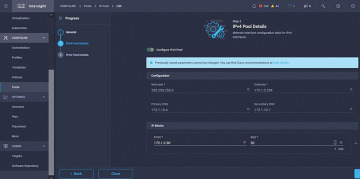
Figure 5-15 IPv4 Pool details for policy configuration
The Pod and Services Network CIDR is defined for internal networking within the Kubernetes cluster. Figure 5-16 illustrates the CIDR network to be used for the pods and services.
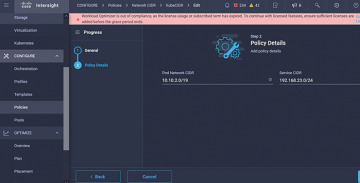
Figure 5-16 CIDR network to be used for the pods and services
The DNS and NTP configuration policy defines your NTP and DNS configuration (see Figure 5-17).
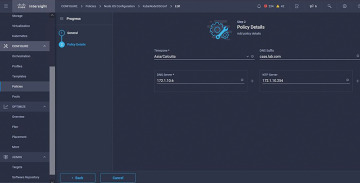
Figure 5-17 DNS and NTP configuration policy
You can define the proxy configuration policy for your Docker container runtime. Figure 5-18 illustrates this policy.
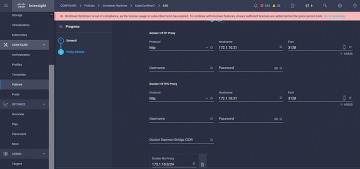
Figure 5-18 Policy for configuring a proxy for Docker
In the master and worker node VM policy, you define the configuration needed on the virtual machines deployed as Master and Worker nodes (see Figure 5-19).
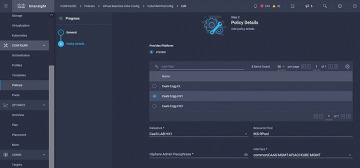
Figure 5-19 Master and worker node VM policy
)
)
)
)
)
Step 2: Configure Profile
Once we have created the preceding policies, you would then bind them into a profile that you can then deploy.
Deploying the configuration using policies and profiles abstracts the configuration layer so that it can be repeatedly deployed quickly.
You can copy this profile and create a new one with modifications on the underlying policies within minutes, to one or more Kubernetes clusters, in a fraction of the time needed for the manual process. Figure 5-20 illustrates the name and tag configuration in the profile.
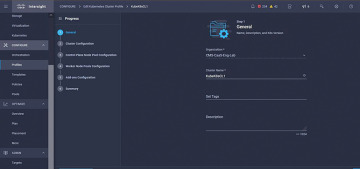
Figure 5-20 Name and tag configuration in the profile
Set the Pool, Node OS, and Network CIDR policies. You also need to configure a user ID and SSH key (public). Its corresponding private key would be used to ssh into the Master and Worker nodes. Figure 5-21 illustrates the created policies being referred to in the profile.
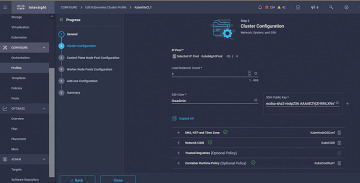
Figure 5-21 Created policies being referred to in the profile
Configure the control plane. You can define how many Master nodes you would need on the control plane. Figure 5-22 illustrates the K8s cluster configuration and number of Master nodes.
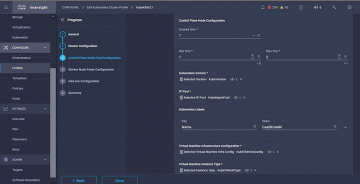
Figure 5-22 Cluster configuration and number of Master nodes
Configure the Worker nodes. Depending on the application requirements, you can scale up or scale down your Worker nodes. Figure 5-23 illustrates the K8s cluster configuration and number of Worker nodes.
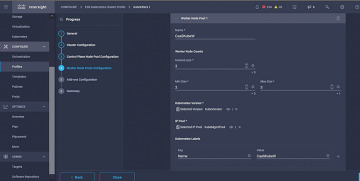
Figure 5-23 Cluster configuration and number of Worker nodes
Configure add-ons. As of now, you can automatically deploy Kubernetes Dashboard and Graffana with Prometheus monitoring. In the future, you can add more add-ons, which you can automatically deploy using IKS. Figure 5-24 illustrates the K8s cluster add-ons configuration.
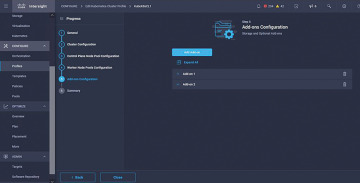
Figure 5-24 Cluster add-ons configuration
Check the Summary and click Deploy.
Figure 5-25 illustrates the K8s cluster Summary and Deployment screen.
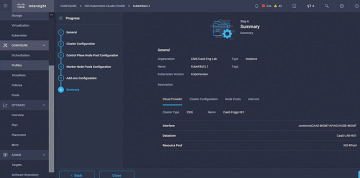
Figure 5-25 Cluster Summary and Deployment screen
)
)
)
)
)
)
Summary
Containers are the latest—and arguably one of the most powerful—technologies to emerge over the past few years to change the way we develop, deploy, and manage applications. The days of the massive software release are quickly becoming a thing of the past. In their place are continuous development and upgrade cycles that are allowing a lot more innovation and quicker time to market, with a lot less disruption—for customers and IT organizations alike.
With these new Cisco solutions, you can deploy, monitor, optimize, and auto-scale your applications.